1 Architecture and Requirements
TraxrGRC is a self-hosted web application that runs as a small set of Docker containers on one server. Each organization gets its own instance: its own application, background worker, database and file store. Nothing is shared between instances, and there is no central service that an instance calls home to.
This chapter describes the parts of an instance, how they connect, and what the server and the network must provide. Read it before you install, and keep it at hand when you plan firewall rules, monitoring and backups.
1.1 Components
An instance is defined by docker-compose.yml in the release directory. One
application image, built from the release's Dockerfile, runs in three roles
(migrate, web and worker); the other services use public images.
| Service | Image | What it does | Runs |
|---|---|---|---|
db | postgres:18-alpine | The PostgreSQL 18 database holding every record, the audit log and the background job queue. | Always. Not published outside the Docker network. |
migrate | Application image, role migrate | Applies database migrations, creates or updates the application's database role and its grants, adds missing reference data, encrypts any stored secret still in plain text and, on an empty database only, creates the first administrator. Then exits. | Once per docker compose up, before web and worker. |
web | Application image, role web | The Next.js application server on port 3000: every page, the REST API, SCIM, the MCP endpoint and /api/health. | Always. |
worker | Application image, role worker | Background jobs: email delivery, daily reminder sweeps, notification rules, scheduled reports and the weekly in-app backup snapshot. | Always. |
caddy | caddy:2.11-alpine | Optional HTTPS reverse proxy with automatic certificates. | Only with --profile tls. |
mailpit | axllent/mailpit:v1.21 | A local mail catcher for trying out notifications. Never use it in production. | Only with --profile dev. |
The instance keeps its state in four named Docker volumes. Compose prefixes
each with the project name (grc unless you set COMPOSE_PROJECT_NAME), so
the uploads volume of the default project is grc_uploads.
| Volume | Mounted in | Contents |
|---|---|---|
pgdata18 | db at /var/lib/postgresql | The database. |
uploads | web and worker at /app/uploads | Uploaded attachments (including policy documents and evidence), and the weekly in-app snapshots in its backups subdirectory. |
caddy-data | caddy | Certificates and the ACME account. |
caddy-config | caddy | Caddy's saved configuration. |
The database and the uploads volume are everything you must back up. The two Caddy volumes can be recreated: Caddy requests new certificates if they are lost.
1.2 How the components connect
The containers share a private Docker network. Only two things listen on the
host: the web port (on 127.0.0.1:3000 by default) and, with the tls
profile, Caddy on ports 80 and 443.
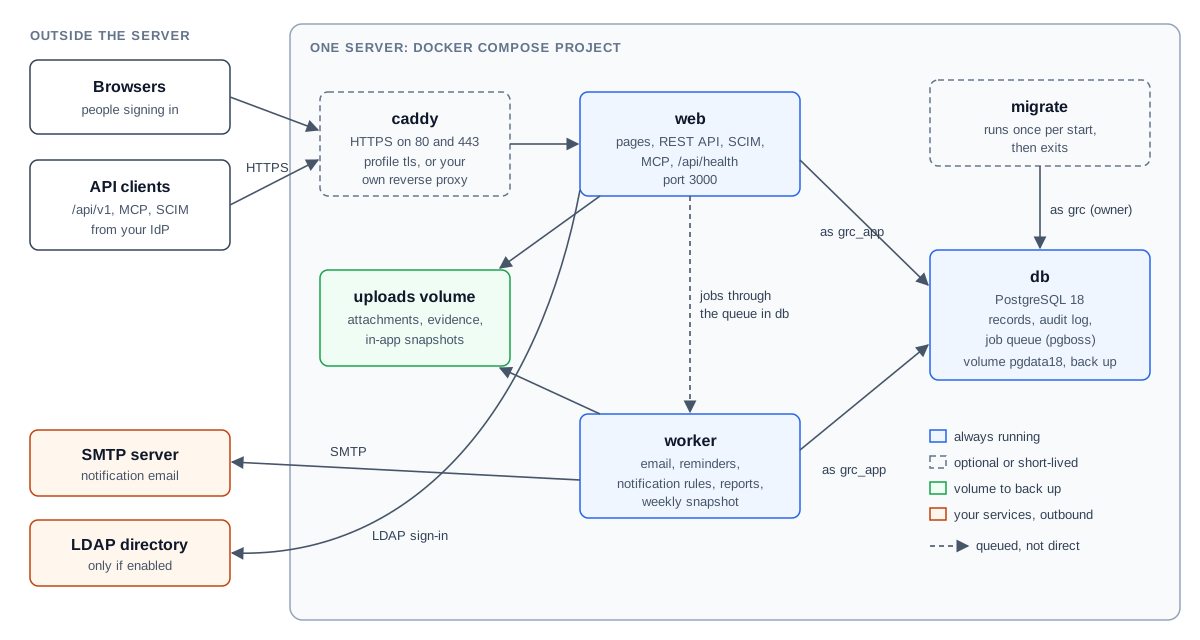
- A browser or API client connects to Caddy (or your own reverse proxy) over
HTTPS. The proxy forwards the request to
web:3000. webreads and writes the database as the application role. It never writes files anywhere except theuploadsvolume and two in-memory directories (/tmpand its Next.js cache).- When something has to happen later or outside the request (an email, a
notification rule),
webputs a job on the queue. The queue is pg-boss, stored in the database's ownpgbossschema, so there is no separate message broker. workertakes jobs from the queue, runs the scheduled tasks, and sends email through the SMTP server configured under Settings → Integrations.
Start-up order is enforced by Compose: migrate waits for db to report
healthy, and web and worker start only after migrate has finished
successfully. If migrate fails, web and worker do not start, so the
application never runs against a database it has not prepared.
1.2.1 Database roles
The database has two login roles, and the split is part of how the audit log is protected.
| Role | Name (default) | Password | Used by |
|---|---|---|---|
| Owner | POSTGRES_USER (grc) | POSTGRES_PASSWORD | migrate, and deploy/backup.sh and deploy/restore.sh, which run inside the db container. Owns every table. |
| Application role | APP_DB_USER (grc_app) | APP_DB_PASSWORD | web and worker. |
The application role can read and write the application's tables, but on the
audit log it can only read and add entries; it owns nothing in the
application's schema and so cannot alter, disable or drop the audit log's
triggers. It owns the pgboss schema, which the queue needs. Neither web
nor worker is given the owner's password.
migrate creates the application role on the first start and, on every
start, sets its password from APP_DB_PASSWORD and reapplies its grants. A
changed password or a new table needs nothing more than docker compose up -d.
1.2.2 Background jobs
The worker registers these queues and schedules. All schedules are in UTC.
| Queue | When | What it does |
|---|---|---|
send-email | As jobs arrive | Sends one queued notification email. |
send-rule-email | As jobs arrive | Sends one email produced by a notification rule, with retries. |
daily-sweeps | The digest schedule set under Settings → Notifications (default 0 7 * * *, 07:00 UTC daily) | Marks lapsed risk, compliance and policy exceptions as expired (audited), then review and deadline reminders and digests, deadline-based notification rules, online assessment repeats and reminders, the POA&M sync from requirement status, and policy acknowledgement reminders. |
notification-rules | Every minute | Reads new audit log entries for notification rules and recovers stuck rule deliveries. |
report-schedules | Every minute | Runs scheduled reports that are due. |
weekly-backup | 0 3 * * 0 (Sundays at 03:00 UTC) | Writes a signed in-app snapshot to the uploads volume and keeps the newest four. |
Saving the digest schedule under Settings → Notifications applies it at once; no restart is needed. If the save cannot reach the job queue (for example because the worker has never run), the page says so and the worker picks up the saved schedule when it next starts.
Jobs wait in the database while the worker is stopped and run when it comes back, so stopping the worker delays email; it does not lose it.
1.2.3 Container hardening
web, worker and migrate run as an unprivileged user (uid 100, gid 101)
with a read-only root filesystem, no Linux capabilities and
no-new-privileges. The application code in the image is owned by root, so
even the application cannot change it. The only writable places are the
uploads volume, /tmp and, for web, /app/.next/cache (both in memory and
emptied on restart). The bundled Caddy runs with the same settings, keeping
only the capability to listen on ports below 1024. The image contains
production dependencies only.
1.3 Host requirements
| Item | Requirement |
|---|---|
| Operating system | A Linux server (x86-64 or ARM64) with Docker Engine and the Docker Compose v2 plugin (the docker compose command). |
| CPU and memory | 2 vCPU and 4 GB of RAM are enough for most organizations. Building the image during installation and upgrades is the most demanding step. |
| Disk | 20 GB to start. Plan for the database, uploaded files, the Docker images (each upgrade builds a new image and keeps the previous one for rollback), and local backup copies if you keep them on the same server. |
| DNS | A host name of its own for the application, for example grc.example.com, pointing at the server. Do not share the name with other services (see Security Hardening, HSTS). |
| Host tools | sh, tar, find and openssl. For encrypted backups, age. |
| Time | The server clock synchronized (NTP). Session expiry, SAML assertion checks, sign-in throttling and every schedule depend on it. |
1.4 Supported browsers
TraxrGRC is a Next.js 16 application and supports the browsers Next.js supports: current versions of Chrome, Edge and Firefox (version 111 or later) and Safari 16.4 or later, on desktop. The product's automated end-to-end tests run in Chromium and Firefox. JavaScript and cookies must be enabled.
1.5 Network ports
| Port | Direction | Used for | Notes |
|---|---|---|---|
| 443/tcp | Inbound | HTTPS to the application | Caddy with --profile tls, or your own proxy. |
| 80/tcp | Inbound | HTTP to HTTPS redirect and the ACME HTTP challenge | Bundled Caddy only. |
| 3000/tcp | Host loopback | web, for the reverse proxy | Bound to 127.0.0.1 by default (WEB_BIND, WEB_PORT). Never publish it to the network without a proxy (see Security Hardening). |
| 5432/tcp | Docker network only | PostgreSQL | Never published on the host. |
| 8025/tcp | Host loopback | Mailpit web interface | --profile dev only. |
| 25, 465 or 587/tcp | Outbound | SMTP to your mail relay | Whatever port the relay uses, set under Settings → Integrations. |
| 636 or 389/tcp | Outbound | LDAP directory | Only if LDAP sign-in is enabled. ldaps:// (636) or ldap:// with StartTLS (389). |
| 443/tcp | Outbound | Let's Encrypt (ACME) | Bundled Caddy only, to obtain and renew certificates. |
| 443/tcp | Outbound | login.microsoftonline.com | Only if AI assistant access with Microsoft Entra ID sign-in is configured. |
| 443/tcp | Outbound, during builds | Docker Hub and the npm registry | The image is built on the server at installation and on every upgrade. |
SAML single sign-on needs no outbound connection from the server: the identity provider's response travels through the user's browser.