9 API Access and Integrations
This chapter covers everything that connects TraxrGRC to other systems: API tokens, the REST API, the Model Context Protocol server for AI assistants, and the practices that keep machine access safe.
9.1 Integration points
| Integration | Address | Authenticates with | Turned on by |
|---|---|---|---|
| REST API | /api/v1/... | API token | Always available |
| OpenAPI document | /api/v1/openapi | None (public) | Always available |
| AI assistants (MCP) | /api/mcp | API token, or Microsoft Entra ID access token | Settings → AI assistants |
| SCIM provisioning | /scim/v2 | SCIM token | Settings → Provisioning (see Authentication and Single Sign-On) |
| LDAP and SAML sign-in | Directory or identity provider | Settings → Integrations (see Authentication and Single Sign-On) | |
| Outbound email | Your SMTP server | SMTP credentials | Settings → Integrations (see Notifications and Email) |
| Outside assessments | /assess/<token> | A per-request link | Sending an assessment (see the User Manual, Online Assessments) |
| Health check | /api/health | None (public) | Always available; answers {"status":"ok"} or 503 |
TraxrGRC has no outbound webhooks and sends nothing to outside addresses except assessment emails, by design. Systems that need to react to changes read the REST API on a schedule.
9.2 API tokens
Settings → API Tokens (address /settings/api-tokens) issues bearer
tokens for the REST API and the MCP server.
| Action | Needs |
|---|---|
| Open the page | apiTokens:read. With it at all you see every token; otherwise only your own. |
| Create a token | apiTokens:create |
| Revoke your own token | apiTokens:update |
| Revoke someone else's | apiTokens:update at all |
None of the built-in roles holds API token rights, so by default only administrators can issue tokens.
The list shows each token's Name, Scopes, Created by, Created, Last used, Expires and Status (Active, Expired or Revoked). Last used is updated at most once a minute.
9.2.1 Creating a token
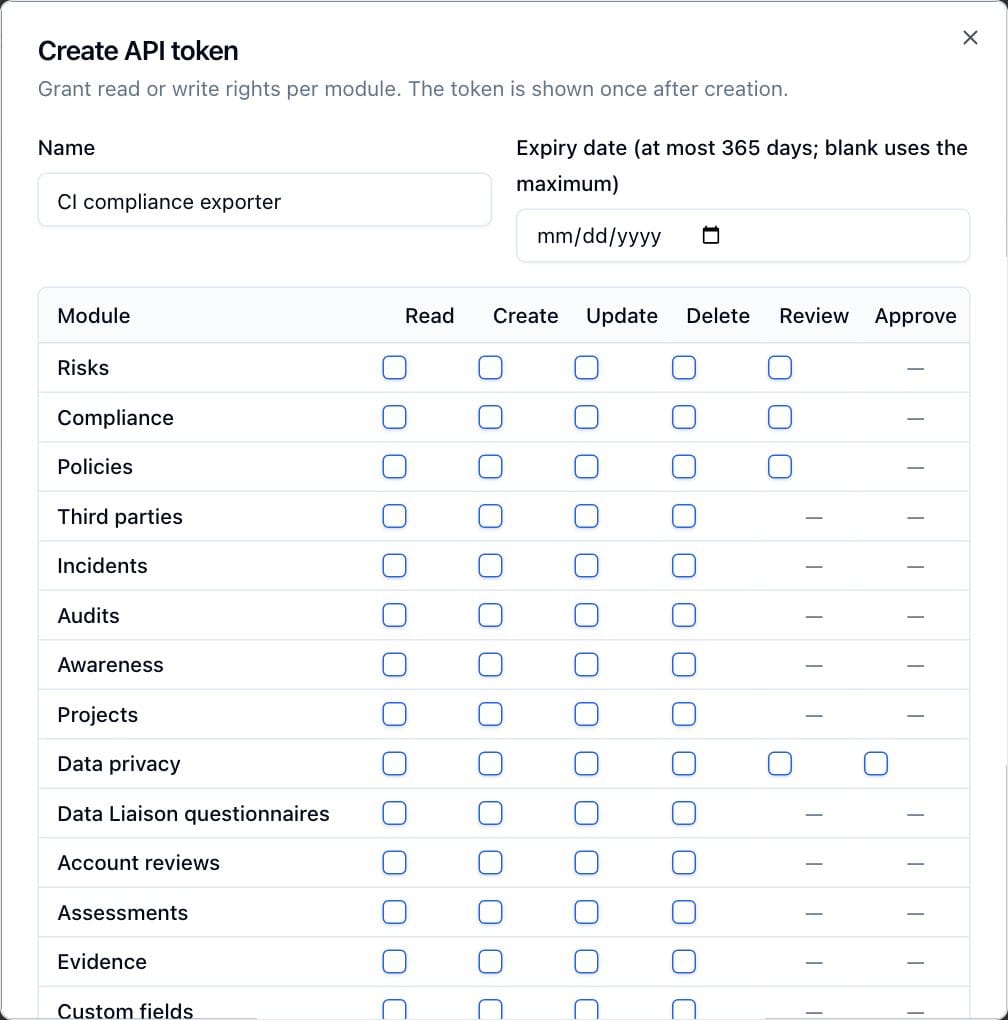
- Click Create token. The Create API token dialog opens.
- Enter a Name that says what uses it and who owns it, for example "SIEM export (Security Ops)". Up to 120 characters.
- Optionally set an Expiry date. The label states the longest lifetime allowed (365 days unless changed on the Sessions page). Blank gets the longest lifetime; a later date is refused. When the maximum is 0, a blank date means the token never expires.
- Tick the scopes: per module, Read, Create, Update, Delete, and Review where the module has it (Risks, Compliance, Policies, Data privacy). At least one is required.
- Click Create token.
- The Token created dialog shows the token once. Copy it into your secret store, then click Done. Only a SHA-256 hash is kept; a lost token cannot be recovered, only replaced.
Creating a token is recorded in the Audit Log and emails every administrator a security alert naming the token, its scopes and expiry.
9.2.2 What a token can do
A token acts as the user who created it, and every request must pass both checks:
- The token's scopes. They bound everything the request does, beyond the endpoint it calls: creating a risk from a DPIA also needs Create on Risks, linking a vendor needs Read on Third parties, and mappings to modules the token cannot read come back hidden.
- The creator's current rights, including own-level access, checked on every request. A token never exceeds its creator. If the creator loses a right, the token loses it too; if the creator is deactivated or deleted, the token stops working (401).
A token works on the REST API and the MCP server. It does not work at the SCIM address, and SCIM tokens do not work on the API.
9.2.3 Expiry, revocation and restores
- An expired token is refused at once and shows Expired.
- Click the trash on a token's row and confirm Revoke token? to stop it. Revocation is immediate, cannot be undone, and is audited.
- Restoring a backup snapshot revokes every API token and every SCIM token (see Backup and Restore). Plan to issue new tokens to every integration, and a new SCIM token to the identity provider, after a restore.
- Changing the maximum lifetime on the Sessions page affects new tokens only.
9.3 The REST API for administrators
Developers find the endpoints, parameters and payloads in the OpenAPI document and the User Manual chapter REST API. What an administrator needs to know:
- Base address:
https://<your address>/api/v1. Requests and responses are JSON; lists page withpageandpageSize(at most 200). - Authentication:
Authorization: Bearer aat_...on every request. Missing, unknown, revoked or expired tokens get 401; missing scopes or creator rights get 403. - OpenAPI document:
/api/v1/openapi, public, cached for five minutes, titled with the product name. Load it into a viewer or client generator. Each operation states the scope it needs. - Coverage: risks (with classifications and the risk scale), controls, assets, business units, compliance packages and analyses, policies, third parties, incidents, audits, projects, awareness, data privacy, account reviews, assessments and custom fields. Not covered: users, groups, roles, settings pages, notifications, the Report Center, the dashboard, the Audit Log and backups.
- Settings through the API: creating risk classifications needs
settings:create; replacing the risk scale (PUT /api/v1/risk-scale) needssettings:update. Reading both needsrisks:read. - Auditing: every change is recorded in the Audit Log naming the token and
its creator. Every refusal is recorded too (module
security, actionpermission.denied, with the reason: missing token, invalid, revoked, expired, scope, creator unavailable, creator rights or rate-limited), at most ten a minute per person or address. - Rate limit: each token may make 600 requests a minute on
/api/v1by default. Past that, requests get429with aRetry-Afterheader giving the seconds until the token's one-minute window ends, and the body{"error":"rate_limited"}. Only the first refusal in each window is recorded (permission.denied, reasonrate-limited). SetAPI_RATE_LIMIT_PER_MINUTEin.envto change the budget, or0to turn it off (see Configuration Reference). The count is kept in each web process, so it resets whenwebrestarts. Large writes are also bounded by the record validation limits (for example 100,000 characters of free text). - Notifications: API changes send no rule emails unless Notify on API changes and CSV imports is on.
A quick check that a token works:
curl -s -H "Authorization: Bearer $GRC_API_TOKEN" \
  "https://grc.example.com/api/v1/risks?pageSize=1"
9.4 AI assistants (MCP)
TraxrGRC includes a Model Context Protocol server at /api/mcp, so AI
assistants (Microsoft Copilot Studio agents, GitHub Copilot in VS Code, Claude
Code and other MCP clients) can search and read records and attach evidence on
behalf of a user. The full reference, with setup for each client, is
docs/MCP.md; this section covers the administrator's decisions.
9.4.1 Turning it on
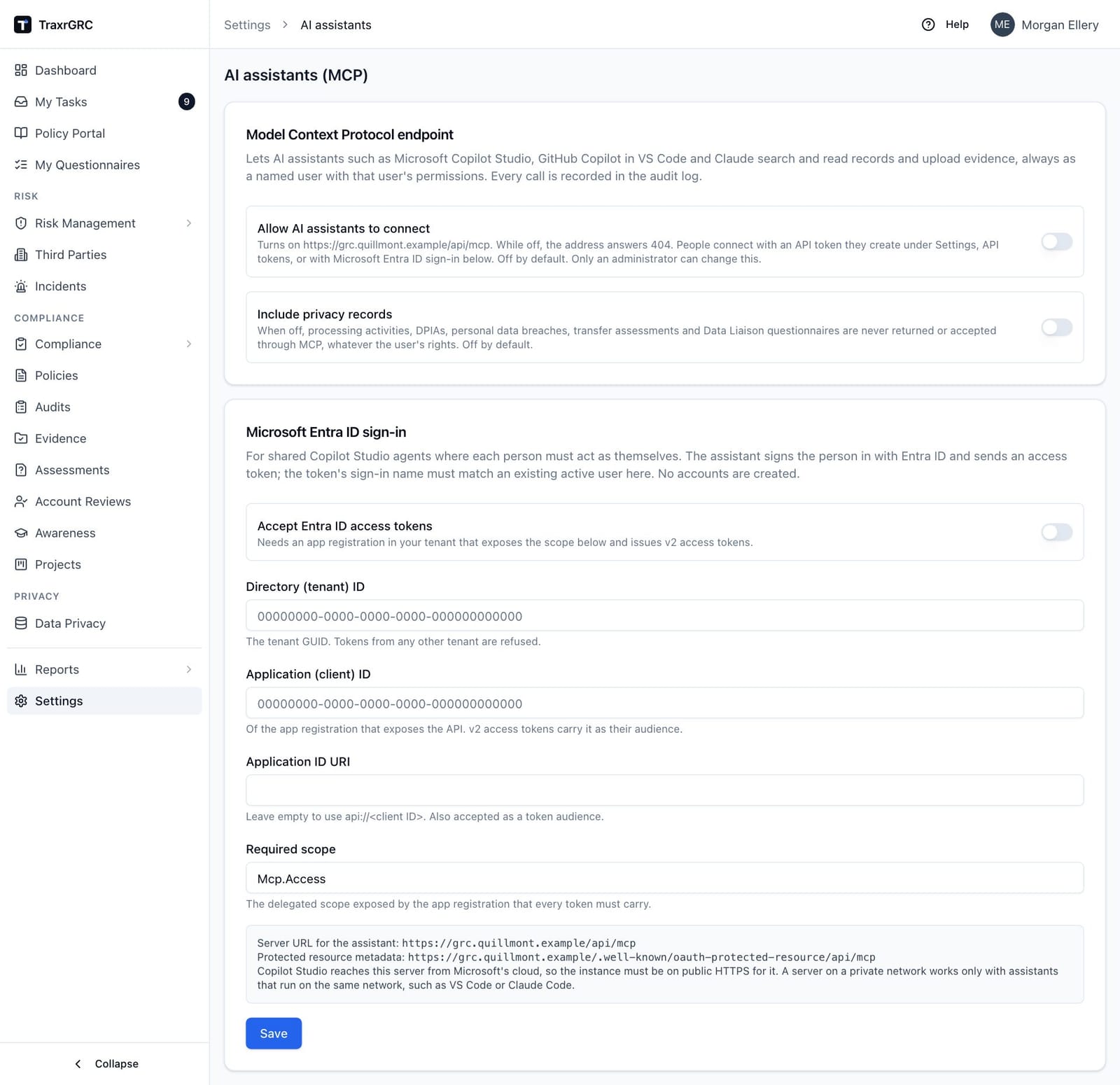
Settings → AI assistants (address /settings/mcp) opens with
settings:read; only an administrator can save. Every save is audited and
emailed to every administrator.
| Setting | Default | Effect |
|---|---|---|
| Allow AI assistants to connect | Off | Turns on /api/mcp. While off, the address and its metadata documents answer 404. |
| Include privacy records | Off | While off, processing activities, DPIAs, personal data breaches, transfer impact assessments, DPA fields on vendors, system data fields on assets and Data Liaison questionnaires are never returned or accepted, whatever the user may see in the app. |
| Accept Entra ID access tokens | Off | Lets people sign in to a shared Copilot Studio agent as themselves. Needs the Directory (tenant) ID, Application (client) ID, optionally the Application ID URI (default api://<client ID>) and the Required scope (default Mcp.Access). |
There is no per-user switch: while the endpoint is on, anyone with an API token or an Entra sign-in can use it. Control access through who may hold tokens.
9.4.2 What an assistant can do
Nine tools, all acting as one named user with that user's live permissions:
| Tool | Purpose |
|---|---|
search | Text search across risks, controls, policies, requirements, vendors, assets, audit plans and findings, incidents, projects, business units and evidence (processing activities when privacy records are included) |
get_record | One record in full, with key linked records and attachment details (including each file's SHA-256) |
list_risks, list_controls, list_compliance, list_policies | Filtered lists |
my_open_items | What is waiting on the user |
list_evidence | Evidence and vendor reports with status, files, links and lock state |
create_evidence, link_evidence, lock_evidence | Record evidence or a vendor's report, link it to the records it supports (or unlink it), and lock it; they need evidence:create or evidence:update, and unlocking stays in the app and the REST API |
upload_evidence | Attach short evidence the assistant writes (up to 10 MB) to a record the user may update; for a control or compliance requirement it lands on new evidence linked to the record, which needs evidence:create |
request_upload_link | A browser link, valid 15 minutes, for the user to upload up to 10 files (25 MB each) to a record |
No tool deletes, unlocks, edits record fields or decides anything; the evidence tools only create evidence, change its links and lock it.
9.4.3 Authentication
- API token: the token's creator is the user, limited to the token's scopes. A read-only assistant needs Read scopes only; the two upload tools also need Update and Create on the target module, and the evidence tools Evidence Create or Update. In Copilot Studio an API key makes every person using the agent act as the token's owner, so use it only for personal agents.
- Microsoft Entra ID: each person signs in as themselves. The account must already exist and be active with the same email as the Entra sign-in name; MCP never creates or links accounts. An account with a password or administrator rights is matched only after it has signed in with SAML or an administrator has allowed linking on it (see Authentication and Single Sign-On).
9.4.4 Limits, auditing and reachability
- 120 tool calls a minute, 20 uploads an hour and 20 upload links an hour, per token (per user for Entra sign-ins), counted in each web process.
- Requests are POST only, JSON only, up to 16 MB, and a request whose
Originis notAPP_URL's is refused. - Every tool call is recorded in the Audit Log (module
mcp, action the tool name) with the user, the token or Entra sign-in, the address and the arguments without file content. Upload links are audited when issued and for each file. - Copilot Studio calls from Microsoft's cloud and needs a public HTTPS address.
A private instance works only with assistants on the same network (VS Code,
Claude Code), and Node-based clients need
NODE_EXTRA_CA_CERTSfor a private certificate authority.
To connect Claude Code with a token, for example:
claude mcp add --transport http grc https://grc.example.com/api/mcp \
  --header "Authorization: Bearer aat_..."
9.5 Service accounts and token practice
A token acts as its creator, so the account that creates it decides what the integration can ever do and whose name appears in the Audit Log.
Use a dedicated service account for each long-lived integration:
- Create a user for the integration, for example
svc-siem@example.com, with a recognizable name ("Service: SIEM export"). Leave Administrator off. - Create a role holding exactly the rights the integration needs, plus Read and Create on API tokens, and attach it to a group containing only the service account.
- Sign in as the service account once, create the token with the same narrow scopes, and store it in your secret manager.
- Take the API token rights off the role afterward if you want no one using that account to issue more. The existing token keeps working.
With SSO only turned on, password sign-in is refused for everyone except break-glass administrators, so a service account must then exist in your identity provider to sign in and create its token.
Tokens created by a person's own account stop working when that person leaves and their account is deactivated, which breaks the integration. Short-lived tokens for one-off jobs (such as the bundle loader) can come from an administrator's account, revoked when the job is done.
Good practice for every token:
- One token per integration, named for the integration and its owner.
- The fewest scopes that work; Read only where the integration only reads.
- An expiry date. Put the renewal in a calendar: create the new token, switch the integration over, then revoke the old one.
- Keep tokens out of command lines, scripts and repositories: use a secret
manager, environment variables or
--token-file. - Review the API Tokens page regularly. Revoke tokens whose Last used is old or empty, and any whose owner has left.
- Watch the security alert emails for token creation you did not expect, and
the Audit Log for
permission.deniedentries naming a token. - After restoring a backup, issue new tokens: a restore revokes them all.